I was given the task today from my direct supervisor to deliver an encrypted netbook to connect to a piece of scientific equipment. They intend on using it in a lab space with limited counter space and would like the availablity to move the computer when its not in use. The netbook meets their needs because of it's small, sleek design.
Error Message
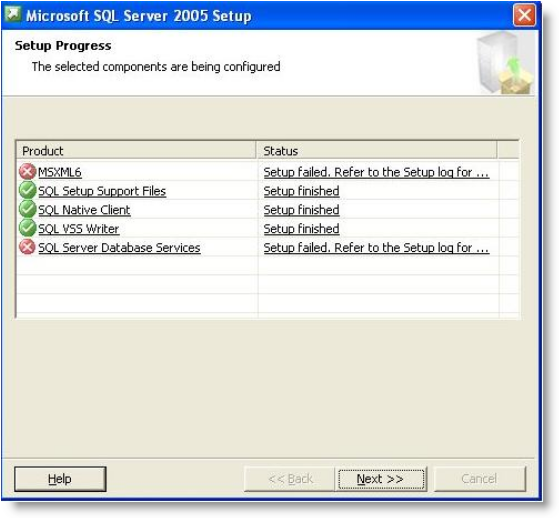
The error I was dealing with today was: "Fatal error during installationMainEngineThread is returning 1603" which was so kindly left in the SQL log. When you attempt to uninstall MSXML 6.0 Service Pack 2 from the Add/Remove Programs in the Control Panel, you receive the following error: "Fatal error during installation."This is every IT customer support person's favorite type of error to manage. It tells you there is a problem but it doesn't actually give much of a clue as to what the problem is without digging deeper into log files.
Explanation
It appears that MSXML 6.0 Service Pack 2 is built in to Windows XP Service Pack 3. The MSXML 6.0 Service Pack 2 package wasn't built to know what to do if the package already exists so it errors out. You need to remove the current MSXML 6.0 Service Pack 2 package and reinstall it.
Resolution
Download & install the Windows Installer Cleanup Utility or MSICUU2.exe. You can locate this installer here*. This utility allows you to uninstall failed installs of programs that were installed using Windows Installer. It was retired from Microsoft's download site on June 25, 2010 due to conflicts with Microsoft Office 2007 and the potential of damaging other components installed on the computer.
Error Message
The error I was dealing with today was: "Fatal error during installationMainEngineThread is returning 1603" which was so kindly left in the SQL log. When you attempt to uninstall MSXML 6.0 Service Pack 2 from the Add/Remove Programs in the Control Panel, you receive the following error: "Fatal error during installation."This is every IT customer support person's favorite type of error to manage. It tells you there is a problem but it doesn't actually give much of a clue as to what the problem is without digging deeper into log files.
Explanation
It appears that MSXML 6.0 Service Pack 2 is built in to Windows XP Service Pack 3. The MSXML 6.0 Service Pack 2 package wasn't built to know what to do if the package already exists so it errors out. You need to remove the current MSXML 6.0 Service Pack 2 package and reinstall it.
Resolution
Download & install the Windows Installer Cleanup Utility or MSICUU2.exe. You can locate this installer here*. This utility allows you to uninstall failed installs of programs that were installed using Windows Installer. It was retired from Microsoft's download site on June 25, 2010 due to conflicts with Microsoft Office 2007 and the potential of damaging other components installed on the computer.

 Posts
Posts


Post a Comment